
BusWhere for Schools
BusWhereMaps & Navigation
4.4150.00 Reviews
- Version
- 3.2.172
- Installs
- 10.00K
- Age Rating
- Everyone
Screenshots
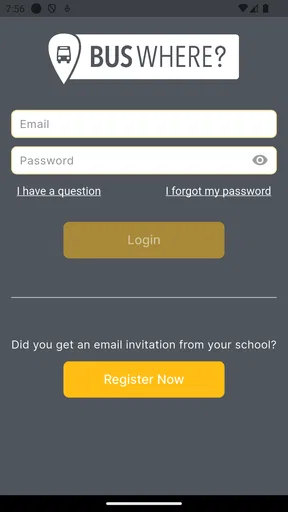
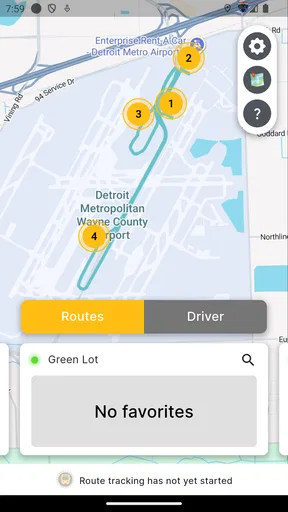
Our Review of BusWhere for Schools
 Analysis by Appyee
When a school bus is late, the difficult part is often not the delay itself but the uncertainty around it. I found that BusWhere is built around solving that very specific problem: giving families a practical way to follow a school bus and check its estimated arrival at a stop. It is a free Maps & Navigation app from BusWhere, and its value becomes clearest during the few minutes when a child is ready to leave but nobody knows whether the bus has already passed, is nearby, or is running behind.
I would not treat it as a general replacement for a full navigation app. It is much narrower and, for the right household, more useful because of that narrow focus. Instead of planning a route across a city, the app is aimed at the daily school-bus routine. That makes it especially relevant to parents, guardians, and students who need timely information about one recurring journey rather than a large collection of maps and directions.
Why live school-bus tracking matters more than another map
The central capability is straightforward: BusWhere lets a user track a school bus, check an estimated arrival time at a stop, and make the morning wait less uncertain. The practical benefit is not simply seeing a vehicle represented on a screen. It is being able to decide when to get ready, when a child should go outside, or whether there is enough time to finish breakfast before heading to the stop.
That distinction matters because ordinary map applications are designed around roads, destinations, traffic, and personal driving or walking routes. They may help someone find a bus stop, but they are not automatically focused on the movement of a particular school bus or the timing of a specific stop. BusWhere’s usefulness comes from putting the school route at the center rather than treating it as one small detail inside a general-purpose map.
In my experience, the best use of this kind of app is not constant monitoring. It is a quick check at the moment a decision needs to be made. A parent can look before sending a child outside, while a student can check whether the bus is approaching instead of standing at the stop for an unnecessarily long wait. That small change can make a repeated weekday routine feel more manageable.
A focused tool for a repeated daily decision
The app’s store summary presents the idea in a very direct way: follow the school bus, view an estimated arrival at a stop, and avoid missing it. What I like about that focus is that it describes a real household problem rather than trying to turn the app into an all-purpose travel companion. The strongest reason to install it is therefore not curiosity about maps; it is the need to make school transportation easier to coordinate.
There is also a useful difference between knowing a scheduled pickup time and knowing an estimated arrival. A timetable can tell a family when the bus is expected under normal conditions, but an estimate is more helpful on a morning affected by a late departure, congestion, weather, or an extended stop. I would still treat any arrival estimate as guidance rather than a guarantee, but it can be much more actionable than relying on a fixed time alone.
One subtle advantage is that the information can help with preparation, not just waiting. If the bus appears to be close, a child can put on a coat and leave promptly. If the estimate suggests more time, a parent may avoid sending a younger child to wait alone too early. The app does not remove the need for judgment, but it gives that judgment a better starting point.
What the app is—and what it is not
BusWhere is an app in the Maps & Navigation category, but I would describe it more precisely as a school-transport tracking tool. That distinction helps set expectations. Someone looking for turn-by-turn directions, walking navigation, public-transit trip planning, or a broad map of nearby places will probably find a conventional navigation service more suitable.
Someone who already knows the school route and only wants to understand the bus’s current progress has a different need. For that person, a specialized interface can be less distracting than a general map packed with unrelated roads, businesses, and travel options. The trade-off is that the app’s usefulness depends heavily on whether the relevant school bus service is available and connected to the experience. It is not a universal tracker for every bus on every road.
That is the first important decision point before relying on it: I would make sure the school’s transportation setup supports the app and that the correct route or stop can be accessed. A download alone does not turn every school bus into a visible vehicle. The app is most valuable when it fits the transportation system a family already uses.
Using the tracker during an ordinary school morning
A realistic scenario shows the value better than a feature list. Imagine a child normally leaves home for the stop at the same general time each morning. On one day, the bus is delayed. Without a live estimate, the family has two imperfect choices: send the child out early and wait without information, or leave later and risk missing the bus. Checking BusWhere gives the parent a current reference for that particular stop, which can support a more sensible decision.
I would use it shortly before the child needs to leave, rather than opening it repeatedly for half an hour. The first check establishes whether the bus seems to be moving normally. A second check, if needed, can help confirm whether the vehicle is getting closer. This workflow keeps the app in its proper role: a quick timing aid, not something that should occupy the user’s attention throughout the morning.
For an older student, the same process can encourage a little independence. The student can check the expected arrival and manage the walk to the stop without asking a parent to call the school or guess from the clock. For a younger child, an adult can use the information to decide when supervision is needed. The benefit changes with the age of the passenger, but the underlying problem is the same: reducing uncertainty around pickup time.
How I would make the information useful
I would begin by identifying the exact stop that matters, not simply watching a route in a broad area. An estimated arrival at the wrong stop can create false confidence, especially if several stops are close together. Families with more than one child should also be careful to check the appropriate route for each child instead of assuming that one bus movement represents every school pickup.
I would also leave a small safety margin. If the screen suggests that the bus is approaching, that is a reason to be ready rather than a reason to wait until the final moment. Estimated times can change as the vehicle progresses, and a child should not be encouraged to run toward a stop or cross a road carelessly because a tracker shows a short arrival window. The app can improve timing, but it should not replace normal road awareness.
Another practical habit is to treat the regular schedule as a backup reference. If the app cannot be checked at a particular moment, the family should still know the usual pickup routine. A tracking tool is most helpful when it adds current context to an established plan. It is less wise to build the entire morning around a single estimate and then have no alternative when circumstances change.
Where general navigation apps still have the advantage
Compared with a typical map app, BusWhere is more specialized but less broadly useful. A general navigation service is better when I need to find an unfamiliar address, compare driving routes, estimate a walking journey, or combine several types of transportation. It is also the natural choice for a family planning a trip beyond the school commute.
BusWhere has the stronger case when the question is much narrower: “Where is the school bus serving this stop, and when might it arrive?” A general map may show streets and perhaps transit information, but it is not necessarily organized around the child’s assigned school route. The specialized approach can save time because it avoids making the user reconstruct the answer from unrelated map information.
This is a useful trade-off rather than a flaw. I would keep a general navigation app for travel planning and use BusWhere for the school-bus question. Trying to make one service handle both jobs can be less convenient than accepting that they solve different problems.
The best setting for BusWhere
The app makes the most sense in a household where school-bus timing regularly affects the morning routine. It is particularly well suited to families with children who wait at a stop outside the home, households where adults have work or caregiving responsibilities, and students who are old enough to check an arrival estimate themselves but still need reliable transportation timing.
Consider a parent working from home while preparing one child for school and caring for a younger sibling. A delayed bus can create a long, inconvenient wait outside, while a bus that arrives earlier than expected can be missed during a rushed morning. A quick look at the tracker helps the parent choose whether to finish packing a lunch, walk to the stop, or supervise the child outside. The app does not solve every scheduling problem, but it can remove one unnecessary guess.
It can also help during unusual mornings when the normal rhythm is disrupted. A child may be slower to get ready, a parent may be returning from an appointment, or the weather may make waiting outside unpleasant. In those moments, a current estimate is more useful than memorizing the usual pickup time. The information has value precisely because the day is not following its normal pattern.
When the experience may be less useful
I would be cautious about depending on it if the school bus is not represented in the service available to the family, if the child’s route changes frequently without a clear way to identify the current one, or if the household expects detailed journey planning beyond school transportation. In those situations, the app may not solve the main problem.
It may also be less valuable for a child who lives close enough to school to walk safely, for a family that drives every day, or for someone who only wants a static list of bus stops. The strongest benefit comes from live timing at a stop. If that timing is not relevant to your routine, the specialized nature of the app becomes a limitation rather than an advantage.
Families should also remember that an estimate is not the same as a promise. A displayed arrival can help with preparation, but it should not be treated as permission to leave a child unattended in an unsafe place or as proof that a bus will arrive at an exact second. My recommendation is to use the information to make a conservative plan, especially for younger children and busy roads.
What the app’s age, support, and current release mean
BusWhere is free and rated for Everyone, which makes it easy to consider for a household with both adults and students using the same basic tool. The developer is BusWhere, and the app has been available since Apr 16, 2015. That history suggests it is an established product rather than a newly appearing experiment, while the current version, 3.2.172, indicates that the app has continued in a maintained release line.
It supports Android 7.0 and newer. For someone using an older phone, that minimum requirement is worth checking before planning around the app. On a supported device, I would still make sure the phone has enough battery for the morning and that the user can access the app when needed. A tracker is only helpful if the family can open it at the relevant moment.
The public response is encouraging without being a reason to ignore personal fit: BusWhere holds a 4.4 average from around 500 ratings, with around 150 written reviews, and has passed 10 thousand installs. Those figures suggest that many users find the focused purpose worthwhile, but they do not guarantee that every school district, route, or household will have the same experience. Availability and daily usefulness matter more here than popularity alone.
Questions I would settle before relying on it
The first question is whether the school’s bus service is supported and whether the correct route and stop can be identified. I would settle that before making the app part of a child’s routine. The second is who will use it: a parent checking for the household, an older student checking independently, or an adult supervising a younger child. That choice affects how much safety margin should be added around the displayed estimate.
The third question is whether the family needs only school-bus timing or a broader transportation tool. If the answer is broader, a general navigation app will probably remain necessary. The fourth is how the family will respond when the estimate changes or is unavailable. Keeping the normal pickup time in mind and having a simple backup plan prevents the app from becoming a single point of failure.
Finally, I would ask whether the app genuinely reduces stress in the household. For one family, checking a bus location may prevent a daily wait. For another, the school route may be so predictable that opening a tracker adds no meaningful benefit. The free price makes trying it relatively easy, but the right test is practical: does it improve the decision about when to go to the stop?
My recommendation for the right kind of school commute
I see BusWhere as a focused solution to one recurring problem rather than a complete navigation platform. Its strongest capability—checking a school bus’s progress and estimated arrival at a stop—can have a real effect on mornings because it turns an uncertain wait into a more informed choice. That is especially valuable when a child’s safety, a parent’s work schedule, or a difficult weather day makes timing important.
I would recommend giving it a try if your family depends on a supported school-bus route and often wonders whether it is time to leave for the stop. Use the estimate as guidance, keep a safety margin, and maintain the usual schedule as a backup. Those habits make the tracker more useful without asking it to do more than it is designed to do.
I would skip it as a primary tool if you need turn-by-turn directions, broad public-transit planning, or transportation information unrelated to a school bus. In those cases, a conventional navigation service is the better fit. But for families whose daily question is simply whether the school bus is close enough to head outside, BusWhere offers a clear and practical answer—and that focused usefulness is exactly why I would recommend it to a friend in that situation.
Verdict
Strengths of BusWhere for Schools
- Real-time bus tracking helps families see estimated arrival times.
- Parents can receive alerts about route changes and bus activity.
- School-specific access keeps transportation information relevant.
- Simple map view makes it easy to follow a child’s bus route.
- Can reduce waiting time at stops, especially in bad weather.
Limitations of BusWhere for Schools
- Availability depends on the school district supporting BusWhere.
- Location updates may be delayed by weak cellular coverage.
- Some features require accurate student and route information.
- The app may use noticeable battery and mobile data during tracking.
- Parents may need separate access if children attend different schools.
Similar Picks in This Category
View All
Uber - Request a ride
Uber Technologies, Inc.4.7


inDrive. Rides with fair fares
® SUOL INNOVATIONS LTD4.8

Yandex Go: Taxi Food Delivery
Mikromobilnost LLC Belgrade4.8

Bolt: Request a Ride
Bolt Technology4.8

Rapido: Bike-Taxi, Auto & Cabs
Rapido Bike Taxi4.8
Frequently Asked Questions
What is BusWhere for Schools and who is it designed for?
BusWhere for Schools is a school transportation management app intended for parents, guardians, schools, and transportation providers. It helps families view relevant bus information, receive updates, and stay informed about student transportation. The exact features available can vary depending on whether the school or bus operator has enabled the service and how the local transportation program is configured.
How does BusWhere for Schools help parents track a student’s bus?
When supported by the school district and the vehicle’s equipment, BusWhere for Schools can provide transportation updates such as route progress, estimated arrival information, or notifications related to a student’s bus. It is important to remember that tracking accuracy may depend on GPS coverage, mobile connectivity, driver equipment, and route conditions. The app should be used as a helpful guide rather than a guarantee of an exact arrival time.
Do I need an account or an invitation from my child’s school to use the app?
In most school transportation systems, access is connected to the student’s official transportation records. Parents or guardians may need to register with an email address or phone number and use an invitation, access code, or information supplied by the school or transportation provider. If your child’s details do not appear after signing in, contact the school transportation office instead of creating multiple accounts.
Will BusWhere for Schools work if my school or transportation provider does not use it?
The app’s usefulness depends heavily on participation from the school district or transportation company. If your local provider has not integrated BusWhere for Schools, you may be unable to access routes, student information, live vehicle data, or notifications. Before downloading, check the instructions sent by your school or ask the transportation department whether the app is officially supported in your area.
Are notifications and live bus locations always accurate and available?
Notifications and live location features can be affected by internet access, GPS availability, device settings, service interruptions, route changes, and delays in data transmission. A bus may occasionally appear stationary or show an outdated position, particularly in areas with weak coverage. Keep notifications enabled, allow the necessary permissions, and continue following official school messages when weather, emergencies, or schedule changes affect transportation.
